


TL;DR
For most US insurance agencies, an off-the-shelf insurance CRM or agency management system (AMS) is the right first move. Purpose-built platforms like EZLynx, HawkSoft, AgencyBloc, and NowCerts/Momentum deliver policy tracking, renewals, and carrier connectivity out of the box, far cheaper and faster than building from scratch.
Building a custom CRM only makes financial sense at scale or with genuinely unusual workflows. Custom development typically runs $30,000 to $300,000 (most mid-tier builds land at $75,000 to $150,000) plus 15 to 20 percent of that per year in maintenance, and generally pays back versus per-seat software only for teams of roughly 20 or more users.
The money is in retention. Per Agency Performance Partners (cited by Pacific Crest Services, 2025), bundled auto and home clients retain around 91 percent versus roughly 67 percent for single-policy clients, and per Bain and Company's Frederick Reichheld (via Harvard Business Review, 2014), a 5 percent retention increase raises profits 25 percent or more. Whatever you choose must handle NAIC data-security rules, the GLBA Safeguards Rule, and 2025 TCPA opt-out rules.
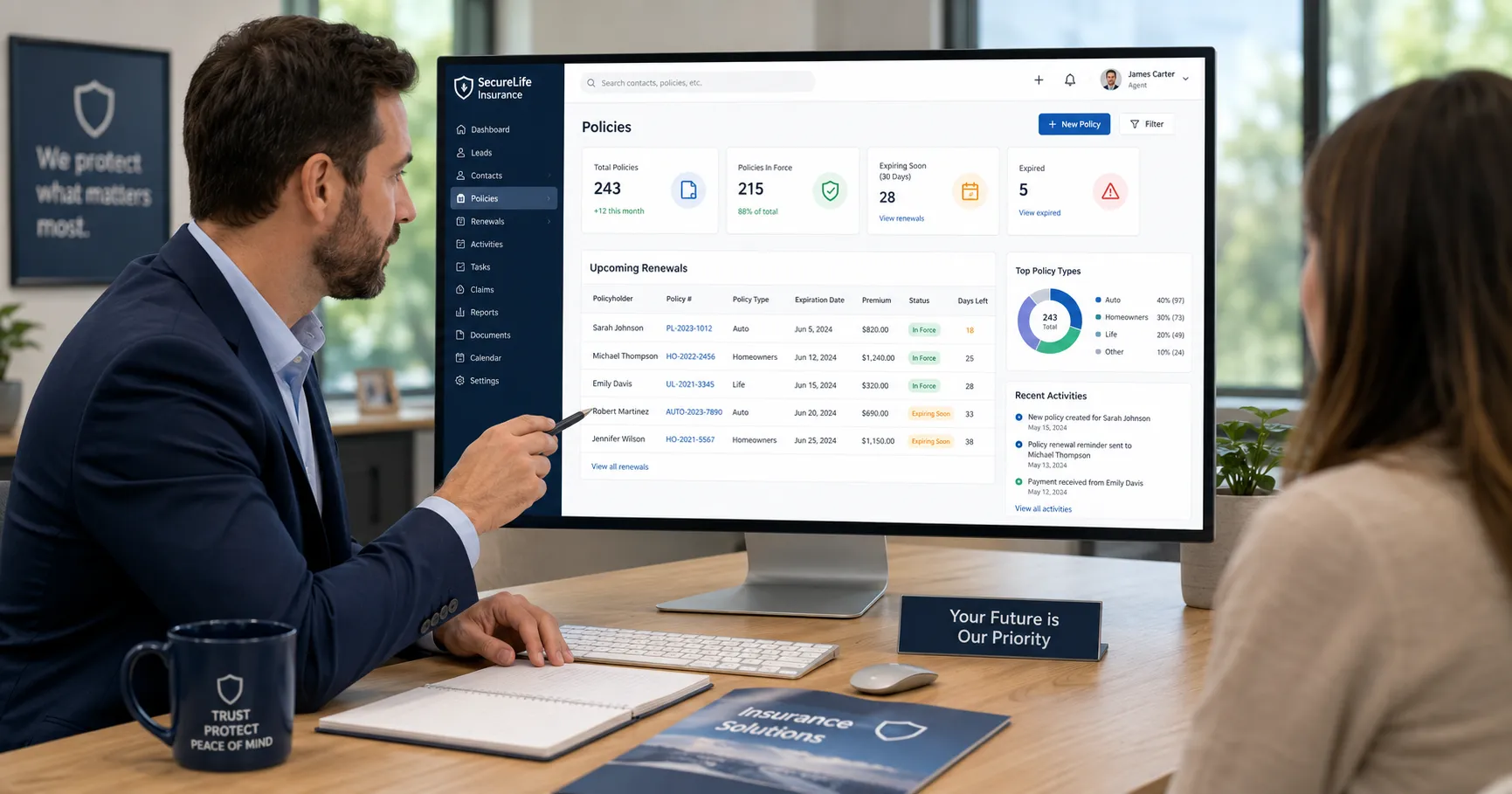
An insurance agent reviewing client policies and renewals in a CRM dashboard
If you run an insurance agency, your book of business is the asset, and the software that tracks it decides how much of that book you keep. The question owners wrestle with is whether to buy a ready-made insurance CRM, buy a full agency management system, or build something custom. This guide walks through what these tools actually are, the real economics of buy versus build, honest pricing, the compliance rules you cannot skip, and how to keep the decision simple. Your agency also needs a professional web presence to bring the leads in, and a done-for-you website covers that side for free, so your budget can go toward the CRM and growth rather than the site.
What a CRM (and an AMS) actually is
A CRM, or customer relationship management system, is a smart digital address book that also tracks every interaction, task, and opportunity with each prospect and client. It is the difference between a shoebox of business cards and a system that reminds you to call the right person at the right time with the right information.
For an agency, a generic CRM falls short because it knows nothing about insurance. It tracks contacts and deals, but has no built-in concept of a policy, an effective date, a renewal, a carrier, a premium, or a commission. An insurance CRM adds those objects. An agency management system (AMS) goes further: it stores policies, processes carrier downloads (the automated feed of policy data from insurers), handles accounting and commission reconciliation, generates certificates and ACORD forms, and keeps compliance records. As one industry description puts it, an AMS includes CRM features but is tailored to an agency's needs like policy management, commission tracking, and compliance.
Modern platforms blur the line by bundling both. EZLynx, HawkSoft, and AgencyBloc are AMS platforms with CRM built in, while tools like AgencyZoom and InsuredMine lean toward the sales-and-marketing side. The practical question for an owner is not "CRM or AMS?" but "does one system track my clients, my policies, my renewals, and my commissions in one place?" If your setup today is a spreadsheet plus carrier portals plus sticky notes, almost any purpose-built platform pays for itself in reclaimed hours. The upgrade that matters most is single data entry: enter a client once, and it flows to quoting, servicing, and renewals.
Why insurance agents need a CRM
Five insurance-specific pressures make a CRM more than a nice-to-have.
Retention. Per AgencyBloc, the average agency keeps about 84 percent of clients a year while top performers reach 93 to 95 percent (figures originating with Agency Performance Partners). Because it costs seven to nine times more to acquire than to retain (per the Independent Insurance Agents of Dallas), and a 5 percent retention bump can raise profits 25 percent or more (per Bain and Company's Frederick Reichheld, via Harvard Business Review, 2014), the renewal reminders in a CRM are pure profit protection.
Cross-sell. Multi-policy clients are far stickier. Bundled auto and home clients retain around 91 percent versus 67 percent for a single policy (Agency Performance Partners, cited by Pacific Crest Services, 2025). A CRM that flags coverage gaps turns one-policy clients into multi-policy ones.
Renewals. Missing a renewal is losing a client. Automated renewal pipelines keep nothing from slipping.
Lead-response speed. In competitive personal lines, the first agent to respond often wins. The often-cited figure is the 2007 MIT Sloan and InsideSales.com study led by Dr. James Oldroyd, which found the odds of qualifying a lead drop sharply when you call in 30 minutes instead of 5. That "21 times" number is directional and is frequently misattributed to a separate 2011 Harvard Business Review article, so treat it as a strong hint rather than a law. The practical point holds: automated instant text and email acknowledgment is how a small shop competes with a call center.
Compliance. Audit trails, consent tracking for texting and calling, and secure handling of client data are increasingly required by law. A CRM that logs every communication is also your evidence file if a client disputes what was said.
Speed also depends on filling the top of the funnel, which is where local SEO and marketing earn their place: the CRM converts leads faster, but something has to generate them first.
The market numbers, and why to distrust most of them
This is an area to be skeptical of confident statistics. Published "insurance CRM software market" figures conflict wildly, from about $290 million (Market Growth Reports) to $2.5 billion in 2023 (Dataintelo) to roughly $12.4 billion (Verified Market Reports). That is close to a 40x spread in base-year size, which tells you these estimates are not reconcilable, and nearly all come from SEO-driven research vendors rather than primary research.
The more defensible adjacent numbers come from reputable firms: Mordor Intelligence pegs the broad insurance software market at about $14 billion in 2025 growing around 6.3 percent a year, and the overall CRM market at roughly $88 billion. For adoption specifically, the Big "I" (IIABA) Agency Universe Study counts roughly 39,000 independent property and casualty agencies in the US and found e-signature adoption rising to 70 percent in 2024. The honest summary: digital-tool adoption is high and rising, and CRM growth is solidly double-digit broadly, but any single "insurance CRM" dollar figure should be treated as a rough directional estimate. This is the same lesson as our warning about vendor-reported claims: check who produced a number before you trust it.
Core features an insurance CRM must have
Whether you buy or build, these features separate an insurance CRM from a generic one: lead and pipeline management, policy tracking (carrier, premium, effective and expiration dates on one client record), renewal automation, comparative-rater integration so client data flows into quoting without re-entry, commission tracking that reconciles carrier statements against policies, secure document management, compliance and audit trails, carrier downloads (IVANS is the common backbone), e-signature, and two-way SMS and email with opt-out handling. The single biggest time-saver most agents cite is single data entry feeding a comparative rater. If you write personal lines, a native or tightly integrated rater is close to non-negotiable.
The leading off-the-shelf platforms
Pricing below is from public and third-party sources as of late 2025 and early 2026. Most insurance vendors quote custom pricing, so confirm directly before you commit.
Platform | Best for | Rough pricing |
|---|---|---|
EZLynx (Applied) | Personal-lines P&C, market-leading rater | Rater ~$150 to $200/mo; full AMS ~$350 to $600/mo |
HawkSoft | Ease of use, personal + small commercial | ~$94 per user/mo plus a base fee |
Applied Epic | Large or commercial, multi-location (20+ staff) | ~$250 to $350 per user/mo, long implementations |
Vertafore AMS360 | Mid-market, strong accounting/commissions | ~$99 to $260 per user/mo |
NowCerts / Momentum | Small P&C agencies, value pick | from ~$169/mo |
AgencyBloc AMS+ | Life, health, Medicare, benefits | Grow plan from ~$109 per user/mo |
Salesforce / Zoho / HubSpot | Generic CRMs needing insurance configuration | Zoho ~$14 to $65/user/mo; Salesforce FSC from ~$325/user/mo |
The rule of thumb: match the tool to your lines of business first, price second. For a life, health, or Medicare shop, AgencyBloc is usually the default. For a personal-lines P&C independent under about 15 staff, EZLynx or HawkSoft. For heavy commercial or multi-location, Applied Epic or AMS360. Generic CRMs like Salesforce, Zoho, and HubSpot are cheaper per seat and more customizable, but they have no concept of a policy or a renewal until you build one, so budget for configuration. This is the same software-stack thinking we cover in our guide to the small-business software stack.
Should you build a custom CRM?
Building is the right call in a minority of situations. Consider custom only when your workflows are genuinely unusual (specialty programs, wholesale or MGA operations), your commission structures are complex (multi-tier producer splits, overrides, IMO or FMO hierarchies), you are multi-line and no single vendor serves both your P&C and L&H sides, per-seat pricing scales badly for you, or data ownership genuinely matters. With software you rent access and your data lives in the vendor's system; with a custom build you own the code, the database, and the data outright.
Here is the honest math. Custom development clusters at $30,000 to $300,000, with most mid-tier builds at $75,000 to $150,000, plus data migration ($3,000 to $40,000) and each integration ($1,500 to $25,000). Budget 15 to 20 percent of the build cost per year for maintenance, so a $100,000 system implies roughly $15,000 to $20,000 a year just to keep running. An MVP takes 3 to 4 months, a fuller mid-tier system 6 to 9 months. Industry guides consistently put the breakeven versus per-seat software at around 20 or more users, typically paying back within 2 to 3 years.
Most agencies do not meet these thresholds, and a custom build carries real risk: cost overruns, delays, key-person dependency, and the ongoing burden of being your own software company. Do not build to avoid a subscription you simply find annoying. Build only because the economics or workflows genuinely demand it. If you do go custom, phase it and validate before you spend, the same discipline we lay out in our post on validating an idea before you build: ship the core (clients, policies, renewals) first, prove it with real users, then add automation and integrations.
Compliance you cannot skip
This is informational, not legal advice, and much of it is state-specific. Any CRM you buy or build has to support these.
NAIC Insurance Data Security Model Law (#668). As of August 8, 2025, 28 US jurisdictions have implemented it (per the NAIC's Government Affairs brief). It applies to licensed agents and requires a written information security program, a designated responsible person, vendor oversight, and breach notification to the state commissioner (the model says within 72 hours; some states allow more). Some states exempt very small agencies.
GLBA Safeguards Rule. The Gramm-Leach-Bliley Act treats agencies as financial institutions. The FTC Safeguards Rule (strengthened 2021, effective June 2023) requires a written security program, encryption, MFA, and monitoring, with a 2024 amendment requiring breach reporting for incidents affecting 500 or more consumers.
TCPA. Since April 11, 2025, consumers can revoke texting and calling consent by any reasonable means, and businesses must honor opt-outs within 10 business days. Violations run $500 to $1,500 per message, so your CRM must document consent and process opt-outs across channels.
HIPAA and SOC 2. Health and Medicare lines handle protected health information, so if HIPAA applies your CRM must secure it. When choosing a vendor, SOC 2 Type II certification signals audited security controls; ask any provider for their report.
Where Zero Dollar Website fits
To be clear about our lane: Zero Dollar Website does not build insurance CRMs, and for most agencies this guide's honest recommendation is to buy one rather than build. What we do is remove the cost of the other essential piece, your website. A professional agency site is where prospects check you out before they call, where your quote forms live, and where your local search presence starts. We build and host that site for you at $0, so the budget you were going to spend on a template or a freelancer stays free for the CRM, the rater, and lead generation.
From there, the paid services are optional and only if you want them: local SEO to rank for the coverage searches in your area, marketing to feed the CRM with leads, and Concierge to keep the site current as your lines and carriers change. If you would rather have everything managed under one plan, that lives on our agency page, and you can compare the free build with paid options on our pricing page. See the kind of sites we ship on our website examples and outcomes on our case studies.
Key takeaways
Default to buying an insurance-specific CRM or AMS. Match it to your lines of business first, price second.
Build custom only at roughly 20+ users or with workflows and commission structures no vendor handles. Expect $75,000 to $150,000 plus 15 to 20 percent a year.
Retention and cross-sell are the financial case. Renewal automation and bundling prompts protect the book you already have.
Compliance is not optional: NAIC data-security rules, the GLBA Safeguards Rule, and 2025 TCPA opt-out handling must be supported.
Keep your website cost out of the equation with a free done-for-you site, so your money goes to the CRM and growth.
FAQ
What is the difference between an insurance CRM and an AMS?
A CRM is the relationship and sales layer: leads, pipelines, follow-ups, and retention. An AMS (agency management system) is the system of record: policies, carrier downloads, accounting, commissions, certificates, and compliance, and it usually includes CRM features. Most modern insurance platforms combine both, so the practical test is whether one system tracks your clients, policies, renewals, and commissions together.
How much does an insurance CRM cost?
Off-the-shelf platforms generally run from about $94 to $350 per user per month depending on the tool and your lines, with small-agency options like NowCerts from around $169 a month. Generic CRMs like Zoho start lower per seat but need insurance configuration. These are public and third-party figures from late 2025 and early 2026, and most vendors quote custom pricing, so confirm directly.
Should I build a custom CRM instead of buying one?
Usually no. Building makes sense mainly at around 20 or more users, or when your workflows and commission structures genuinely cannot be handled by any vendor. Custom development typically costs $75,000 to $150,000 for a mid-tier build plus 15 to 20 percent a year in maintenance, and takes 6 to 9 months. For most agencies an off-the-shelf platform is faster, cheaper, and lower-risk.
Do I need an insurance-specific CRM, or will a generic one work?
A generic CRM like Salesforce, Zoho, or HubSpot manages contacts and pipelines but has no built-in concept of a policy, renewal, carrier download, or commission. You can configure one, but insurance-specific platforms handle those natively out of the box. For most agencies the purpose-built tool saves more than it costs, though a heavily customized generic CRM can fit unusual needs.
What compliance rules does an insurance CRM need to meet?
At minimum, support for the NAIC Insurance Data Security Model Law where your state has adopted it (28 jurisdictions as of August 2025), the federal GLBA Safeguards Rule (written security program, encryption, MFA), and 2025 TCPA rules requiring you to honor opt-outs within 10 business days. Health and Medicare lines add HIPAA. Ask any vendor for SOC 2 Type II proof.
Does Zero Dollar Website build CRMs for insurance agents?
No. We build and host your agency website for free and offer optional paid services like local SEO and marketing. The CRM is a separate decision, and for most agencies buying a purpose-built platform is the right move. Getting the website off your cost list simply frees up budget for the software that runs your book.
The smart order of operations for most agencies is simple: get a professional website in place first so leads have somewhere to land, then buy the CRM that matches your lines. We handle the first part at no cost. Start your free done-for-you website today, compare it with optional growth services on our pricing page, and browse more plain-English guides on our blog.